Oooh that smell…

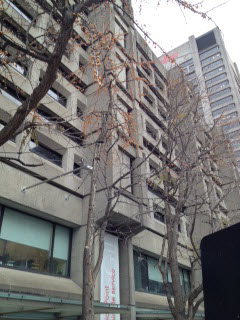
If you’ve walked by the McLennan Library Building on McTavish Street over the past few weeks, then you’ve likely been overcome by a distinctly foul odour. The first time you smelled it, maybe you figured some guy vomited in front of Service Point on the way back from Peel Pub the previous night. But as the days passed with no relief, you began wondering how such a truly fetid smell could linger in the open air for weeks on end.

So what’s the source? It’s actually Ginkgo biloba.

The row of trees lining the western side of the building are ginkgos. These fascinating trees have been called “living fossils,” as they are by far the longest surviving species of tree on earth. Native to China, they have thrived for over 200 million years. Ginkgos are particularly resilient. In fact, a group of them survived the atomic bomb that exploded on Hiroshima, and are still alive today.

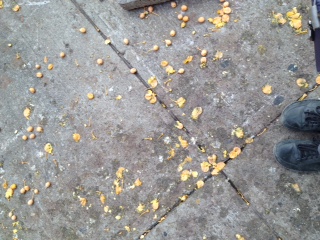
The odour, however, comes from the grape-sized ginkgo seeds. As they fall to the ground each autumn, crack open and get stomped on, nasty stink juice is released. Ginkgo trees come in male and female varieties, the latter of which produce the noxious seeds.

smashed ginkgo seeds

You smelling what I’m stepping in?

Unfortunately, McLennan’s larger ginkgos are all females and produce an abundance of seeds each year. Because of the smell, many municipalities will only plant male ginkgos on public land, and even chop down female trees (sexist much?).

But don’t worry, our smelly ginkgos are here to stay. Then again, judging by the looks of these branches, we’re in for plenty more stink bombs in the coming days.

Ginkgo seeds on tree

Bombs away!

There’s an app for that!

Browzine Mobile technology, which includes the proliferation of mobile apps that can be leveraged for research, teaching and learning purposes, has fundamentally changed the way people look for, access, evaluate, and manage information. This past summer I was lucky enough to attend the annual three-day Osheaga music festival. When I received my tickets (RFID bracelets) in the mail, the envelope included information on downloading the Osheaga app. The app was great. It included the three-day schedule, artist biographies, site maps with stage locations, all kinds of multimedia content, and you could use the app to activate your RFID bracelet, which could then be used to enter a whole slew on contests and promotions. It occurred to me more than once during those three days that tailored apps are going to become more commonplace in many aspects of our lives, including libraries!

Although perhaps not as exciting as a three day outdoor summer indie rock concert, the library has created a recommended mobile apps web page, which contains apps selected by librarians that are particularly useful for research, teaching and learning. The web page is still in its infancy, however, we decided to focus on apps which facilitate access to, and use of, collections and resources the library is already subscribing to, as well as apps that will help students and faculty in their daily work. To this end, we have sections on Reading apps, Citation Management apps, and Productivity apps, as well as discipline-specific apps. I predict that the discipline-specific apps section will grow quickly over the next little while, as subject specialist add sections on apps specifically useful in their respective disciplines, as our colleague Jill Boruff has done for health sciences.

The group responsible for the apps web page is also charged with promoting important apps. The first two apps that we’ve decided to highlight are BrowZine and PressReader. BrowZine delivers thousands of academic journals to your iPad or Android tablet. BrowZine works by organizing the articles found in Open Access and subscription databases, uniting them into complete journals, then arranging these journals on a common newsstand. The result is an easy and familiar way to browse, read, and monitor scholarly journals across the disciplines. PressReader is an app that is used to access and download the over 2,000 full-content newspapers & magazines accessible via our PressDisplay subscription. This app works on both smartphones and tablets. To download newspapers you must be on the university network, either on the McGill WiFi, or from home using the Virtual Private Network (VPN).

Please check out our recommended apps page every once in a while to see what new apps have been added, and please feel free to send me any app suggestions that you may have for possible inclusion.

Open Access – Freeing up Scholarly Content

I realize I’m about a week late on this post but I don’t think it has to be Open Access week for us to discuss Open Access issues.

Open access refers to the principle and practice of making scholarly publications free and open to everyone. While you’re at McGill you may not reflect often on the fact that the articles you cite in your papers aren’t actually free. They’re free to you while you’re in school (well…note technically free…you pay tuition) but if you’ve ever tinkered around on Google Scholar and been asked to pay $40 to access an article, you’ve dipped your toe in the world of paid-for academic content.

Why does open access matter? Well, for one, most scholarly articles are to some extent publicly funded (that is, they are authored by people working at publicly funded institutions such as universities). Additionally though, it allows for information to be disseminated and spread to the widest audience possible. The more people who can access the work you’ve done, the more people who can build it on it and advance their own research. It is believed that this leads to greater discoveries and knowledge.

Open access isn’t without its detractors and even within academic circles, certain concepts of open access are misunderstood.

What do you think? Are we moving to a model of free scholarly content? What are your opinions on the open access debate?