
As the liaison librarian for the Trottier Institute for Sustainability in Engineering and Design (TISED), I love it when McGill students and researchers ask me for help finding research related to environmental sustainability and climate action. My two go-to research databases for these kinds of questions are ProQuest One Sustainability and Scopus. The tips below on these databases will be particularly useful for students and researchers in TISED and in engineering but I hope people researching in other fields may find them useful too!
ProQuest One Sustainability
This is the leading sustainability database available through McGill Libraries. You can access it at: ProQuest One Sustainability. This database contains references to journal articles, conference papers, books and book chapters, case studies and more on topics such as environmental engineering, water resources, climate policy and environmental health. The database allows you to filter your results to limit to one or more of the three sustainability pillars: environmental, social and economic.
So, for example, if I wanted to find academic sources on cycling in cities and focus on the social aspects, I could type in: cycling and cities; once the results are displayed, I can choose the “social” filter, under the “sustainability pillar” category, from the left-hand column. My search results will include literature on topics like gender inequality in cycling, the lived experience of cyclists, motivations for cycling, recreational cycling and so on.
Another reason I recommend this database is that it has implemented a feature that maps its research content to the UN Sustainable Development Goals (SDGs), thus allowing researchers to identify literature on many sub-topics within sustainability. The UN goals are 17 specific objectives that are part of a plan that all UN member states adopted in 2015 to reduce poverty, protect the planet and improve the lives of everyone. Research in addressing these goals is helping to solve real-world problems. ProQuest One Sustainability has added the goals into their database to raise awareness of research that is making a difference in the world by addressing critically important issues for humanity and the environment.
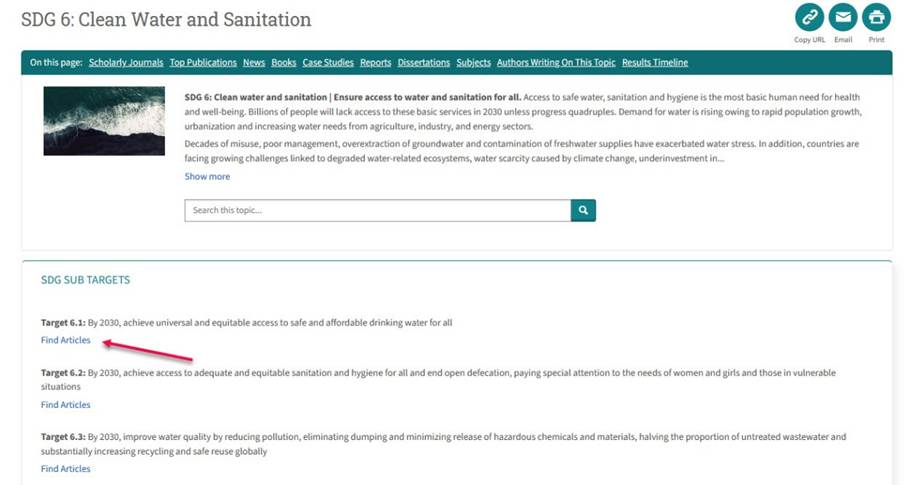
How does this feature work? The database highlights research that relates to each of the 17 goals by listing the goals on the database’s home page. When you click on a specific goal (e.g. “Goal 6: Clean Water and Sanitation”), the database lists the targets within each goal (e.g. “Target 6.1: By 2030, achieve universal and equitable access to safe and affordable drinking water for all”). You can click on “Find articles” to view the literature that addresses this specific target. In the image below, you can see what the “Find articles” link looks like in the database.
One strange quirk of ProQuest One Sustainability is that when you run a search using the default search box on the database’s home page, the database looks for your words anywhere in the description of the items in the database, including in the full text when available. This kind of search is different from most other research databases at McGill that only look for your words in the title, abstract and description of the items and not the full text, which gives a more precise and targeted search. What this means is that in ProQuest One Sustainability, you can get a lot of noise (irrelevant results) cluttering up your search. I recommend going to the “advanced search” and, from the dropdown menu, selecting this option to search instead: “Anywhere except full text.” This kind of search will help you retrieve more focused results and reduce the clutter.
Scopus
Another of my go-to databases for sustainability topics is Scopus and I’ll explain why. Scopus is a multidisciplinary database covering research on every topic you can imagine, and not limited to sustainability-related topics, like ProQuest One Sustainability. You can access it at: Scopus. What makes Scopus stand out in terms of sustainability is that it recently implemented a feature similar to the functionality in ProQuest One Sustainability that ties literature to the Sustainable Development Goals.
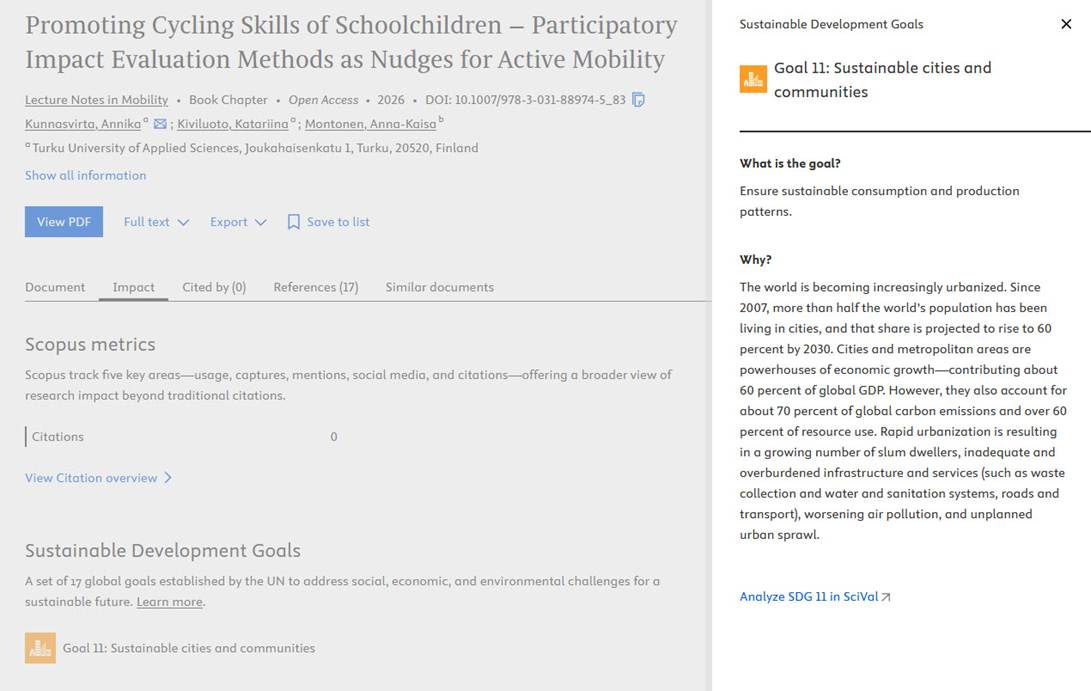
When you run a search, say for cycling in cities, Scopus has incorporated the goals within the description of literature that addresses one or more of the goals. Scopus will help you identify which research articles address the SDGs by indicating, under the “Impact” section of each document’s record, when the research relates to one or more SDGs. Scopus uses machine learning to help identify which articles discuss which SDGs. For example, in my Scopus search: cycling and cities, I found an article on promoting cycling to schoolchildren and after choosing the “Impact” tab, I found that the article mapped to “Goal 11: Sustainable Cities and Communities.” Scopus also gives a summary of what each goal is about and why it is important. Here is what Scopus looks like in action:
Limitations
My hope is that both ProQuest Sustainability One and Scopus will make their mapping features even more useful by integrating a search filter for SDGs, much like the sustainability pillar filter within ProQuest Sustainability One. That way, it will be really easy to filter down from your list of results to only show the literature that addresses a specific SDG. For now, when you run a search in either of these databases from their main search boxes, this isn’t possible. In Scopus, we need to look through all the results in a search one by one to see if there are any SDGs mapped to the research articles. In ProQuest One Sustainability, only those articles listed under the special section on the 17 goals on the database’s home page will get you to research on any specific SDG.
For more information
I hope this gives you a glimpse into how you can use some of McGill Libraries’ best resources to find literature on sustainability topics. You’ll find other resources related to environmental sustainability on my TISED research guide at: https://libraryguides.mcgill.ca/tised and on the Environmental Studies research guide at: https://libraryguides.mcgill.ca/environmental-studies. For help on finding research related to any topic, McGill students and researchers can consult the list of liaison librarians. We’re happy to help!