McGill Library’s Open Access Workshops

McGill Library is offering two fantastic workshops this month, in celebration of Open Access Week. Sure, the workshops are next week, but we’re flexible like that. Mark your calendars and join us for one or both of these informative sessions:


1. Open Access Sources: your key to accessing free and reliable research beyond the university gates
Workshop ● Monday, October 29th ● 12:00 -13:30 ● Redpath eClassroom

Are you wondering what will happen after you graduate and you no longer have access to your McGill subscriptions to online research materials? Come to this hands-on workshop and learn how to:

  • Access reliable research once you’ve graduated from McGill
  • Find and use a variety of Open Access resources that are available for free online

2. Connecting with reliable, open access health information on the Web
Workshop ● Tuesday, October 30th ● 15:00 – 16:30 ● Redpath eClassroom

Do you and your family members have questions about health and wellness? Come to this workshop and learn how to:

  • Find reliable and free online consumer health information to answer your health and wellness questions
  • Assess the information and determine if it will be useful to you, your friends and your family
  • Access a collection of  books, available at McGill, written specifically for consumers on health and wellness topics

To learn more about workshops offered by McGill Library, click here.

Drop off your CV and participate in OA Week

To be sure that your research gets the widest distribution possible, showcase your work in McGill’s institutional repository, eScholarship@McGill. It includes articles, conference papers, books, research reports, and theses.

This is Open Access (OA) Week and it couldn’t be easier to make your research output available to everyone freely online in eScholarship with the Library’s CV Drive. Drop by and drop off your CV and the Library will do the rest.

There are still 2 dates left for the CV Drive: Wednesday, Oct 24th, 12:30 – 14:30, FDA lobby (at the entrance to the Schulich Library), and Thursday, Oct 25th, 14:00 – 16:00, Leacock lobby.

Whether or not you have a CV in hand, librarians will be there to answer all of your questions about OA.

Happy OA Week!

Canadian Library Support Staff Day

Today, Friday, October 19, 2012, has been designated by Canadian Library Association (CLA) as “Canadian Library Support Staff Day“. Library support staff members provide a wide variety of services in the library day-to-day operations: answer your questions, lend you a laptop, help you locate a particular book on the shelf, assist you in using uPrint machines in the library, etc. As the CLA website says, “the purpose of the day is to celebrate and show our appreciation for the work of library technicians, library assistants, library clerks, pages, shelvers, and all other support staff members who perform daily miracles in our public, private, school, government, academic, and corporate libraries.” So, if you will come to the library today for whatever reason, please do not forget to say thank you to the staff.

OA Week approaches

Open access (OA) is free, mostly unrestricted, online access to scholarly output. There is a strong international movement to promote OA and this month there is an Open Access Week, from October 22-28.

From the OA Week About site:

“Open Access” to information – the free, immediate, online access to the results of scholarly research, and the right to use and re-use those results as you need – has the power to transform the way research and scientific inquiry are conducted. It has direct and widespread implications for academia, medicine, science, industry, and for society as a whole.

Over 100 countries will participate in OA Week this year. You will see us around the Library wearing OA t-shirts so be sure to stop and ask us questions. We hope to have a series of blog posts on OA so I will kick things off by pointing to the McGill Library OA pages, including the extensive list of resources on the Learn more about open access page.

Image from PLOS

Keep up-to-date with new pulications in your area

At the beginning of this month I posted about a helpful and time saving current awareness tool, email alerts, and how to set up a search alert in an article database. Today I want draw your attention to another current awareness tool, Table of Contents (TOC) alerts and to JournalTOCs, an excellent aggregating service that allows you to get TOC alerts for specific journals. JournalTOCs contains the latest Tables of Contents of over 20 000 scholarly journals, 4 400 of which are Open Access.

By setting up an account for free (simply a username and password) you can search or browse for the journal titles you want to follow, then JournalTOCs alerts you when new issues of your followed journals are published. You can save and import your selected journal titles into your favourite RSS feed reader, set up TOC email alerts, or both. There are other customization options to explore as well.

Visit the website, sign up, and give it a try. One way to look for journal titles in your discipline is to go to Browse > Subject and then scroll through the alphabetical list. Once you select a subject, you can view those subject-specific journal titles as well as how many followers that title has. You can also see whether the journal listed is subscription-based or Open Access.

JournalTOCs has made it simple to go into your account and deselect journal titles you no longer wish to follow, and to add new ones. So don’t be shy and start experimenting with some of these tools that help to keep you on top of the latest research in your field.

Image from www.journaltocs.ac.uk

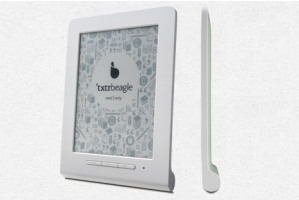
Beagle – the €9.90 e-reader

A tiny e-reader, called Beagle, only five inches and 128 grams, was introduced by Txtr at the Frankfurt Book Fair last week. It has no Wi-Fi embedded, and it needs to work with smartphone to add e-books.  “The main selling point is its low price – €9.90 ($12.88 USD)”. Read more at here.

At McGill University, you actually can borrow an e-reader from the Library. To find an e-book, you may explore this page or search in the e-book sub-catalogue.

Did you feel the earthquake?

I felt the earthquake last Wednesday night and I only realized that it was an earthquake after it had happened.  The Government of Canada has some safety tips on its website about what to do before, during, and after an earthquake.  Natural Resources Canada also has an Earthquake Database that you can search to obtain data about earthquakes in or near Canada since 1985.  Details about last week’s earthquake are available (use the “Report details” menu on the left-hand side of the page to look at the different sections of the report).

Image from Microsoft Office Clipart